We are ready to help
The Best Sims 4 Mods and a No-Nonsense Guide to Installing Them
Mods for The Sims 4 are a PC and Mac feature: EA states they cannot be downloaded on PlayStation or Xbox. Below are seven mods that cover different play styles, followed by a step-by-step install guide and a checklist for when a game patch breaks things.
Quick picks
| If you want to | Mod | Creator |
|---|---|---|
| Control the whole neighborhood | MC Command Center | Deaderpool |
| Edit needs and skills with a click | UI Cheats Extension | weerbesu |
| Make emotions matter | Meaningful Stories | roBurky |
| Add depth to relationships and family life | Relationship & Pregnancy Overhaul | Lumpinou |
| Add illness, doctors and insurance | Healthcare Redux | adeepindigo |
| Supercharge build mode | Better BuildBuy | TwistedMexi |
| Place and resize objects precisely | T.O.O.L. | TwistedMexi |
Every mod here includes script files, so you will need to enable script mods in the game settings. Download only from the creator's own pages: EA and Maxis do not pre-screen, endorse or support third-party mods.
Mods vs custom content
EA splits player-made files into two groups. Custom content, or CC, is clothing, hair, furniture and decor created by players: it expands your options in Create a Sim and build mode. Game mods add features or change how the game works, and they may include script code, though not all of them do.
You can tell them apart by the files. Most downloads arrive as .package files, and the extension alone will not tell you whether you are looking at a sofa or a new mechanic. A .ts4script file only comes with script mods, which is why they need their own setting. All seven mods in this guide are game mods with scripts.
Gameplay mods
MC Command Center
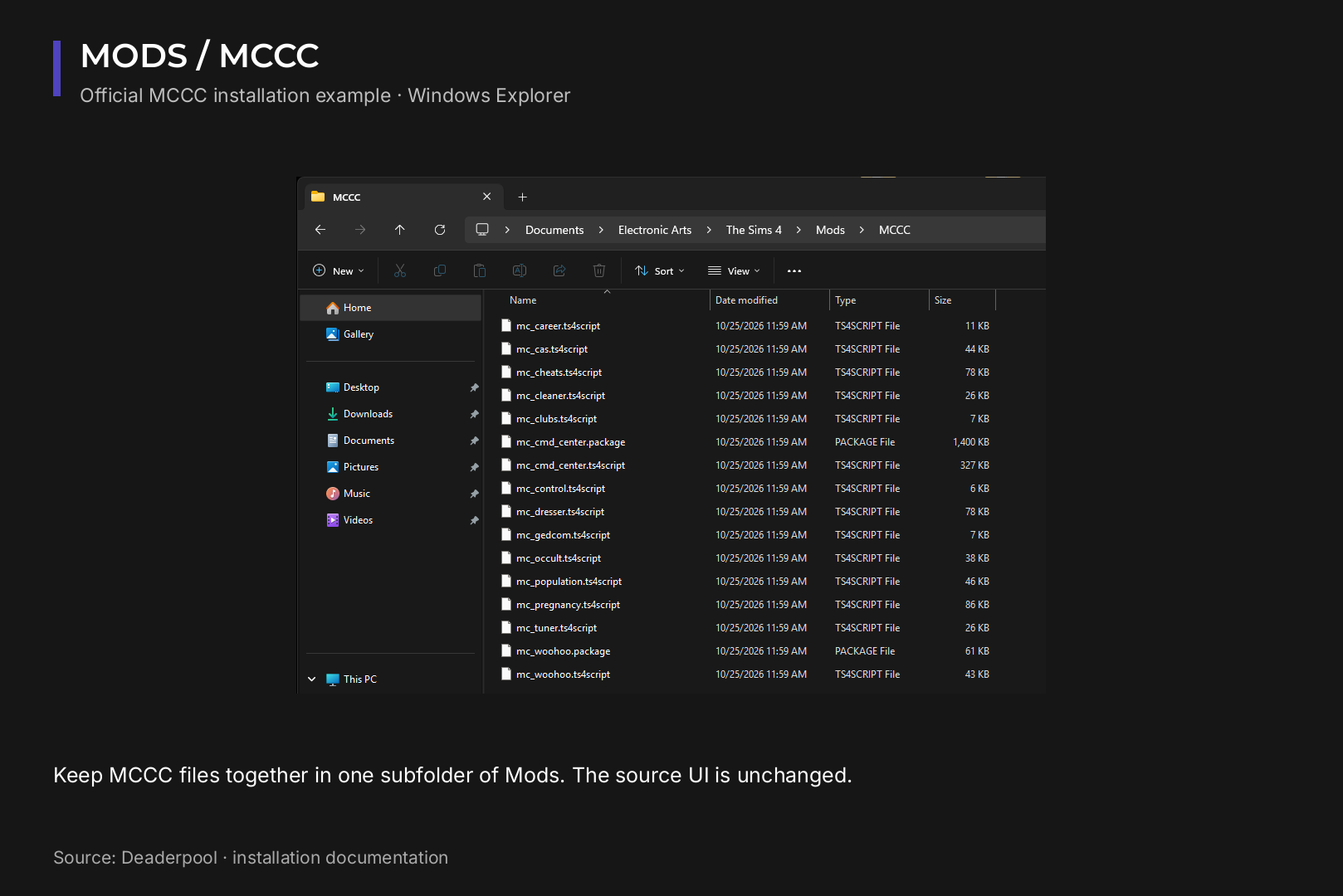
MC Command Center, usually shortened to MCCC, gives you greater control over the game and over how unplayed Sims live their lives. Think of it as a director's console for story progression: who moves in together, who has children, how the population shifts over time. The official site, deaderpool-mccc.com, documents every module and explains how to read the last exception file when something goes wrong.
The mod is modular. The core script file is mandatory, the rest you pick to suit your save, and all MCCC files should stay together in the same folder.
UI Cheats Extension
UI Cheats Extension replaces typed console commands with clicks on the interface itself. Right-click a need bar, a skill level, household funds, a relationship meter or a career panel, and you get cheat options on the spot. Moodlets can be removed the same way, and wants and fears can be completed or rerolled. The mod keeps pace with patches: version 1.54, released in April 2026, added support for Formative Moments in the add trait cheat.
Meaningful Stories
roBurky's Meaningful Stories redesigns the moods and emotions system. In the base game a nicely decorated room can cancel out a breakup within minutes. With this mod, life events weigh more heavily on how a Sim feels, which makes long story-driven saves far more believable.
Relationship & Pregnancy Overhaul
Lumpinou's RPO, formerly known as WooHoo Wellness, is a collection of linked modules rather than a single file. It covers wanting or not wanting children, fertility and protection, paternity tests, temporary separations with custody and child support, jealousy and cheating, and expanded adoption. Every module requires Mod 0, the RPO Core Library. Beyond that you install only the themes you want in your game.
Healthcare Redux
adeepindigo's Healthcare Redux turns health into a real system. Each Sim gets a weak, normal or strong immune system. Viral, bacterial and chronic illnesses need diagnosis and treatment, and the mod adds routine checkups, specialists, a pharmacy app on the Sim's phone and tiered insurance plans. It works with the base game alone. You can skip modules you do not need, but the CORE files must stay in place.
Build mode mods
Better BuildBuy
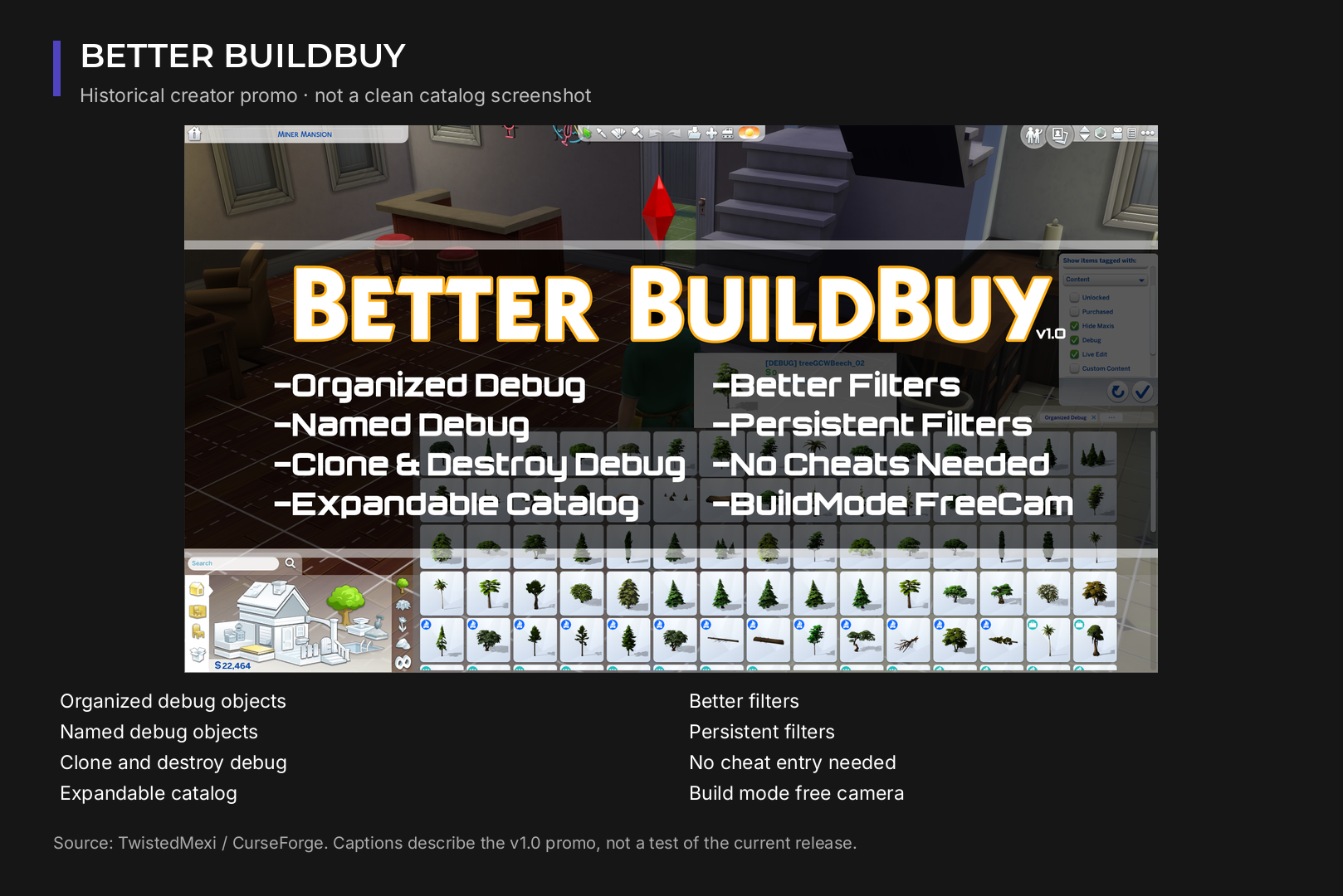
TwistedMexi's Better BuildBuy upgrades the build and buy catalog with better filters, a dedicated filter for Kits, organized debug and Live Edit objects, a lighting editor for color and brightness, and a cinematic camera. You can show or hide custom content without uninstalling it and turn on deletion protection. Several cheats, such as moving objects freely, become simple toggles.
T.O.O.L.
T.O.O.L., also by TwistedMexi, handles precision: moving, rotating and resizing objects beyond the limits of standard cheats, plus editing apartment doors and windows. It pairs with Better BuildBuy but is a separate download.
How to install Sims 4 mods
- Close the game and back up your saves. The saves folder sits next to Mods.
- Open the Mods folder. It lives in your user Documents, not in the Steam or EA app install directory: Documents\Electronic Arts\The Sims 4\Mods. If it is missing, launch the game once or create the folder yourself.
- Unzip the download. Move the .package and .ts4script files into Mods. Leave the .ts4script file as it is: it should not be extracted.
- Respect folder depth. The game only reads script files in Mods or one subfolder down. Mods\MCCC\ works, Mods\Scripts\MCCC\ does not. Package files tolerate deeper nesting, but the creator's instructions always win.
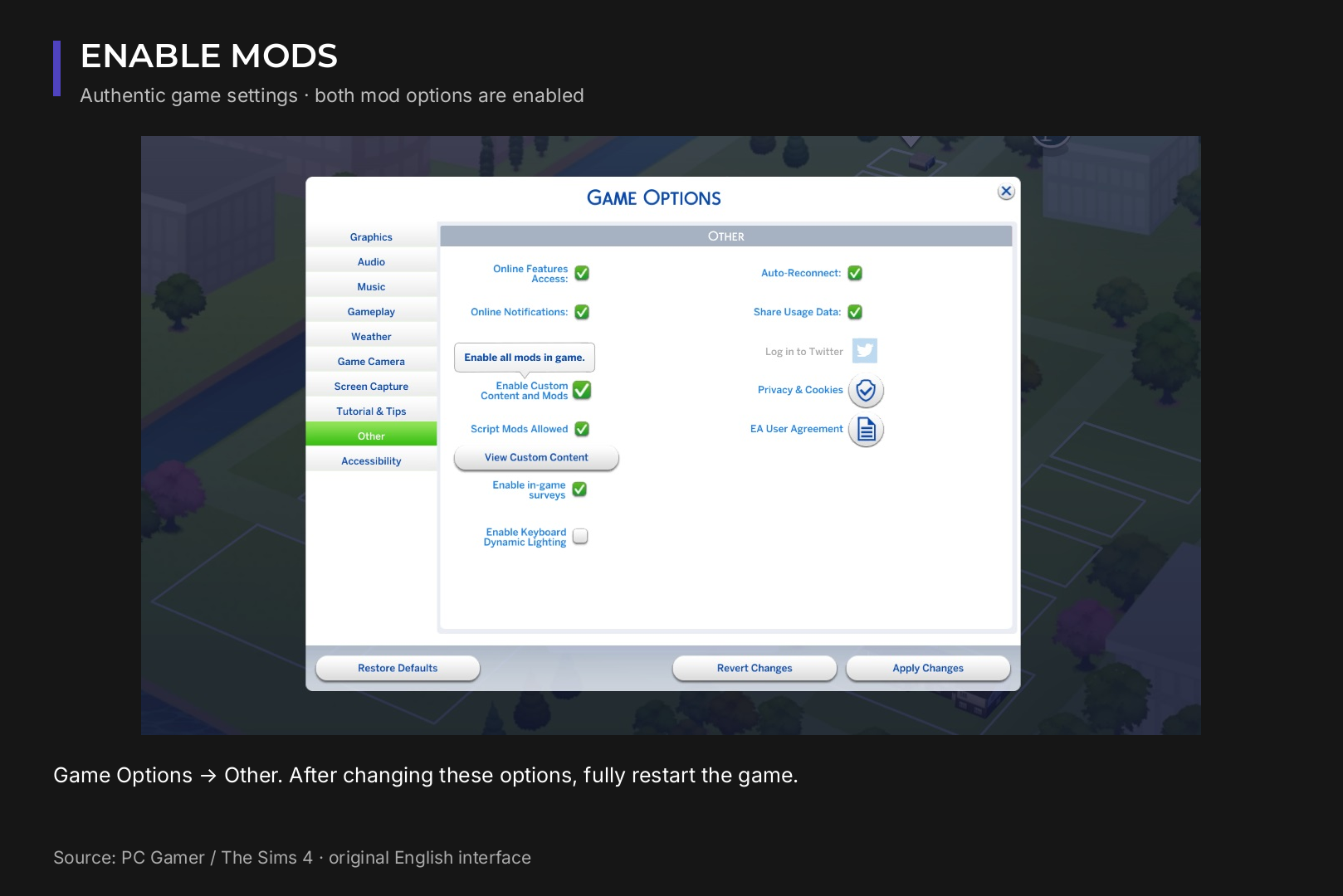
- Enable mods in the game. Game Options > Other > Enable Custom Content and Mods, and also Script Mods Allowed for every mod on this list.
- Restart the game fully. Changes only apply after a relaunch.
- Test in a fresh save. Check that the new menus and interactions appear before you load your main household.
Lots, rooms and households from the Gallery (.trayitem and .blueprint files) go into the Tray folder next to Mods. Any .package items they rely on still go into Mods.
When a patch breaks your mods
Major game updates typically disable mods, and script mods often stop working until their creators release a new version. Work through it in this order:
- check each creator's page for compatibility with the current game version before re-enabling mods;
- replace old files with the new version instead of keeping both;
- if errors appear, open the LastException file in The Sims 4 folder: MCCC documentation notes that an outdated mod or CC is the usual cause;
- still stuck? Remove half your mods, test, then return them in batches until the error comes back.
If you open an old save with mods disabled, exit without saving. Otherwise missing custom items can be removed from that save for good.
Do you need a powerful PC for a modded game?
The Sims 4 itself is light. These are EA's official PC requirements:
| Minimum | Recommended | |
|---|---|---|
| OS | 64-bit Windows 10 | 64-bit Windows 10 |
| CPU | Intel Core i3-3220 or AMD Ryzen 3 1200 | Intel Core i5 (4 cores) or AMD Ryzen 5 |
| RAM | 4 GB | 8 GB |
| GPU | NVIDIA GeForce 6600 or ATI Radeon X1300, 128 MB VRAM | NVIDIA GTX 650 or AMD Radeon HD 7750, 1 GB VRAM |
| Storage | 25 GB plus 1 GB for custom content and saves | 50 GB plus 1 GB for custom content and saves |
Notice that EA lists custom content as a separate storage line. Add a long list of expansion packs and a large CC library and the game folder grows quickly, so an SSD and 16 GB of RAM give you comfortable headroom for loading times and background apps. If you are planning an upgrade, ready configurations are in our gaming PC range.
Recommended
Frequently asked questions We have the answers.
-
Can I use Sims 4 mods on PlayStation or Xbox?
No. EA confirms mods are only available on PC and Mac.
-
I installed a mod but nothing changed. Why?
Usually Script Mods Allowed is off, the script file sits more than one subfolder deep, or the mod has not been updated for the current patch.
-
Where is it safe to download mods?
From the creator's own site or Patreon, or their official CurseForge page. EA does not check third-party files.

 Arabic
 English