We are ready to help
Playing PC Games Without Internet: Launcher Setup and Seven Games That Truly Work Offline
The short answer: the most reliable offline games on PC are DRM-free versions, such as GOG releases whose store page says no activation or online connection is required. Steam games can also run offline, but only after an online first launch and switching the client to Offline Mode. Always online titles like Diablo IV will not start without a connection, even in solo play.
Whether you are preparing for a long flight, a desert camping trip or simply an unreliable connection at home, the steps below will save you from a login screen at the worst moment.
Three kinds of "offline"
A "single player" tag on a store page describes how you play, not whether the game needs to phone home. In practice, PC games fall into three groups.
| Type | What it needs | Example |
|---|---|---|
| DRM-free | just the installer, no connection ever | Hollow Knight, The Witcher 3 on GOG |
| One-time launcher check | an online first launch, then the client's offline mode | most Steam games |
| Always online | a live connection every time | Diablo IV |
DRM-free games are the gold standard. You can download the installer once, keep it on an external drive and install the game on a machine that has never been online. The second group works almost always, provided you prepare in advance. The third group is not an option on the road: Blizzard lists a broadband internet connection in the Diablo IV system requirements, and the game needs a Battle.net account.
Preparing each launcher
Steam
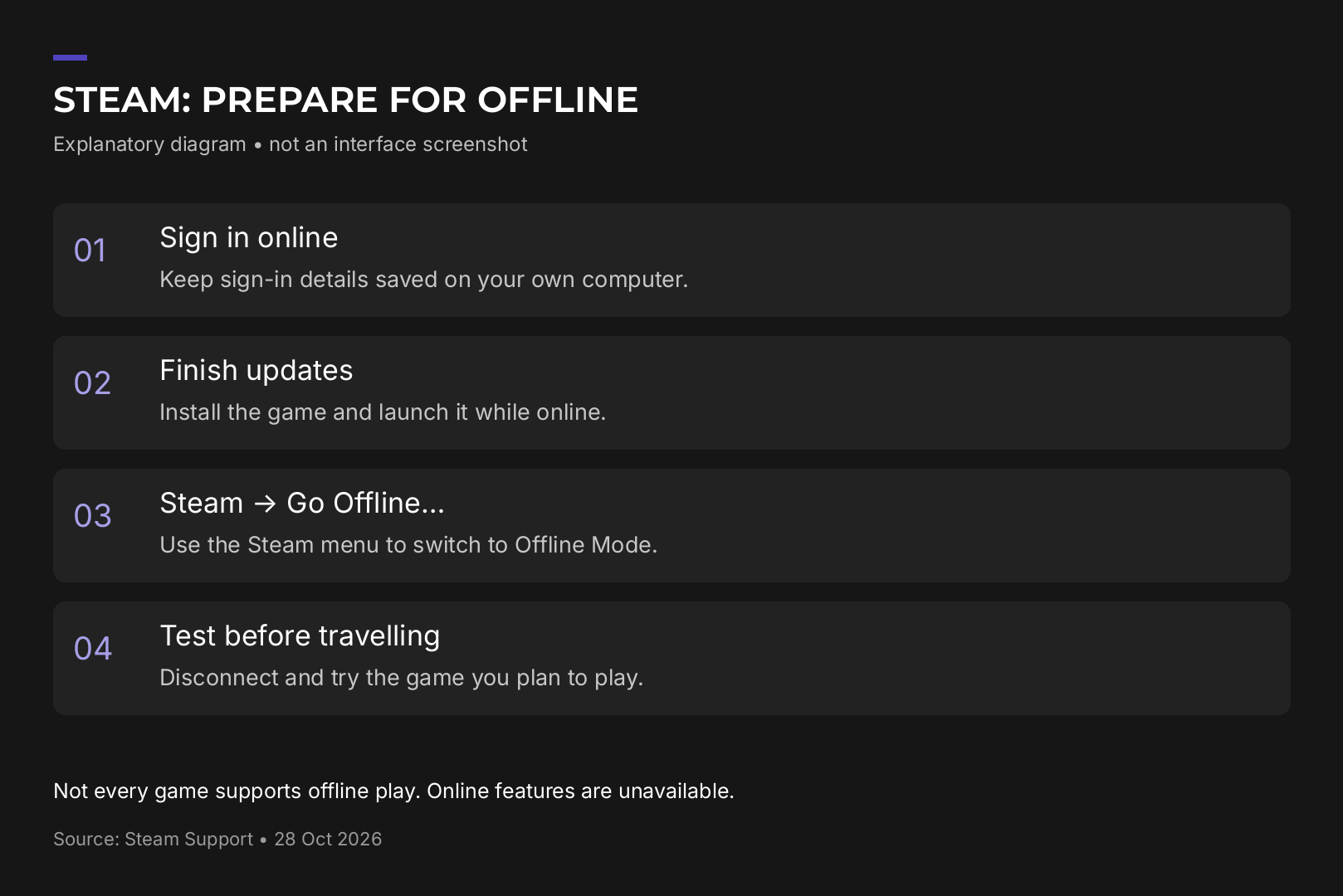
Steam Offline Mode lets you run installed games without Valve's servers, but it has to be set up while you are still online.
- Sign in with a connection and tick "Remember me".
- Let every download and update finish.
- Launch each game you plan to play, complete its first time setup and quit. Steam Support notes that most games need an initial start while connected to the Steam network.
- In the security settings, make sure saving account credentials on this computer is not disabled.
- Use the Steam menu to go offline.
- Exit Steam normally rather than cutting power, so the client can store your login.
One catch: games that require an active connection or use an external launcher will not work in Steam Offline Mode. Some EA titles bought on Steam, for example, still open the EA app, so both clients need preparing.
GOG
GOG sells games without DRM, and each such page carries a DRM FREE label stating that no activation or online connection is required. The GOG Galaxy client is optional: you can grab full offline installers from your library on the website and keep them as backups. Galaxy only adds automatic updates and cloud saves, neither of which works offline anyway.

Epic Games Store
Epic added an offline mode back in 2019. With no connection, the launcher offers to skip sign in and lets you open installed games that support offline play. There is no manual toggle like Steam's, so sync your cloud saves before you leave.
EA app
Open the EA app online and launch the game at least once. Then choose Go offline from the menu in the top left corner. Users on the EA forums report that offline sessions sometimes drop and ask for a fresh login, so test before you travel.
The 15 minute rehearsal
The only real proof is to simulate the trip at home.
- Finish all downloads, including DLC and the voice language you need.
- Let cloud saves sync while you are still online.
- Copy your local save folder to an external drive.
- Turn off both Wi-Fi and Ethernet so the PC cannot quietly reconnect.
- Restart the computer.
- Open the launcher and the game, load your save, play for a few minutes, save and reload.
If a login prompt appears at any step, that game is not ready. Much better to find out on your sofa than at 35,000 feet.
Seven games confirmed to work offline
Every game below has a GOG page that explicitly says DRM FREE with no activation or online connection required. That confirmation applies to the GOG version; the same title on another store may behave differently.
Light enough for any laptop
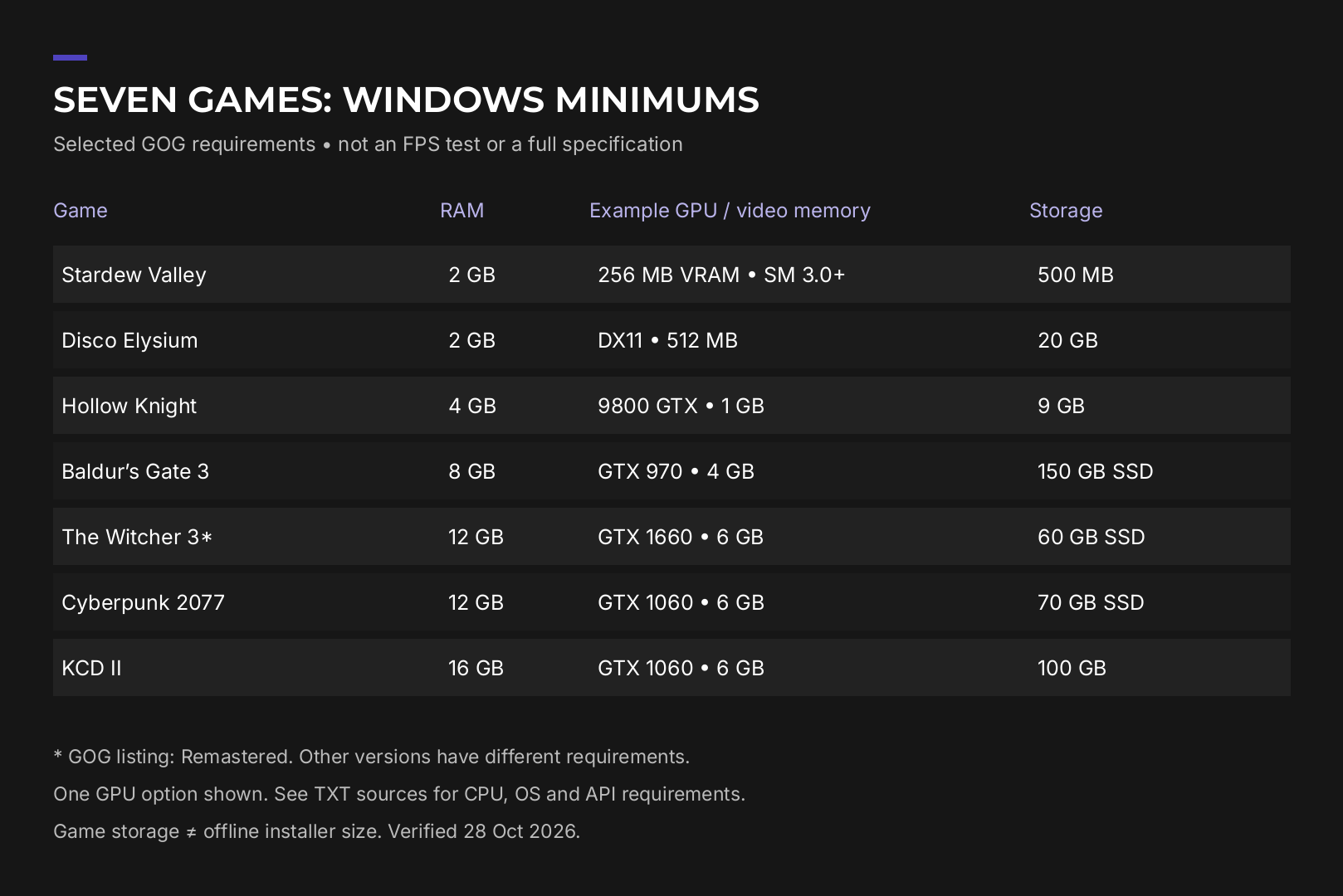
Stardew Valley. Farming, fishing, mining and a small town full of characters, perfect for long journeys. It needs a 2 GHz processor, 2 GB of RAM and 500 MB of storage, and it also runs on Linux and macOS.
Disco Elysium. A detective RPG where almost everything is decided through dialogue and skill checks rather than combat. Integrated graphics with DirectX 11 support, 2 GB of RAM and 20 GB of space are enough.
Hollow Knight. A demanding 2D metroidvania with a huge hand drawn world. GOG states plainly that you do not need GOG Galaxy to play it. Minimum specs are 4 GB of RAM and a GeForce 9800 GTX class card, a GPU from 2008.
For a powerful PC at home
The Witcher 3: Wild Hunt. Geralt's open world adventure with the Hearts of Stone and Blood and Wine expansions. The current version asks for 64-bit Windows 11, a Core i5-8400 or Ryzen 5 2600, 12 GB of RAM and a GeForce GTX 1660.
Cyberpunk 2077. Night City, deep RPG systems and one of the best showcases of ray tracing on PC. Minimum: Windows 11, 12 GB of RAM and a GeForce GTX 1060 6GB or Radeon RX 580 8GB, with a GeForce RTX 2060 SUPER or Radeon RX 5700 recommended.
Baldur's Gate 3. Turn based D&D 5e role playing with memorable companions. It needs Windows 10, 8 GB of RAM, a GeForce GTX 970 or Radeon RX 480 and 150 GB of storage, and an SSD is mandatory.
Kingdom Come: Deliverance II. A grounded medieval RPG set in Bohemia, released in February 2025. Minimum specs are 16 GB of RAM, a GeForce GTX 1060 6GB or Radeon RX 580 and 100 GB of space.
Looking for more large worlds to sink time into? See our guide to games like GTA on PC.
Requirements at a glance
| Game | Min RAM | Min GPU | Storage |
|---|---|---|---|
| Stardew Valley | 2 GB | 256 MB VRAM | 0.5 GB |
| Disco Elysium | 2 GB | integrated, DirectX 11 | 20 GB |
| Hollow Knight | 4 GB | GeForce 9800 GTX | 9 GB |
| Baldur's Gate 3 | 8 GB | GTX 970 / RX 480 | 150 GB SSD |
| The Witcher 3 | 12 GB | GTX 1660 | 60 GB SSD |
| Cyberpunk 2077 | 12 GB | GTX 1060 6GB / RX 580 | 70 GB SSD |
| Kingdom Come: Deliverance II | 16 GB | GTX 1060 6GB / RX 580 | 100 GB |
The spread is huge. The first three will run on an ordinary office laptop, while the last four at minimum settings look nothing like the screenshots that made them famous.
What hardware makes offline gaming better
Storage first. Everything you want to play must be installed in full before you lose the connection. Baldur's Gate 3, Cyberpunk 2077 and Kingdom Come: Deliverance II alone take more than 300 GB, so treat a 1 TB SSD as the sensible minimum and 2 TB as comfortable for a proper offline library.
GPU headroom. For high settings at 1440p in the heavier RPGs you need a card well above the minimum line. Upscalers such as DLSS and FSR run locally on your GPU, so they keep boosting frame rates without internet.
Laptop or desktop. On the road the laptop wins by default, but heavy games run noticeably slower on battery than on mains power. If you mostly play at home and only lose connection now and then, a desktop gives more performance for the same budget. You can tailor a system to the games above in the HYPERPC configurator or browse ready gaming PCs.
Common mistakes
- Installing a game without ever launching it. On Steam that almost guarantees an offline failure.
- Hard powering off the PC. Steam may not have saved your login and will ask you to sign in.
- Forgetting publisher launchers. A Steam purchase can still depend on EA app or another client.
- Trusting the cloud. Cloud saves do not sync offline, so a manual copy of your save folder is cheap insurance.
Recommended

 Arabic
 English