We are ready to help
IOMMU and VBS in FACEIT: What Changed in Anti-Cheat Requirements by August 2026
FACEIT is rolling out the most extensive hardware-security requirements in the platform’s history. Installing the anti-cheat client alone is no longer sufficient: the PC must also demonstrate a trusted boot state and restrict unauthorised devices from accessing system memory. Four technologies underpin these checks: TPM 2.0, Secure Boot, IOMMU, and VBS.
TPM 2.0 and Secure Boot became mandatory for everyone on 25 November 2025. FACEIT rolls out IOMMU and VBS in waves: first a limited group, then everyone above 3000 Elo, then ever wider account segments. By mid-2026 coverage had grown so far that the platform’s own help articles treat the IOMMU requirement as a given, and an independent audit estimates coverage at about 97 percent. FACEIT has not announced a date from which the requirement applies to 100 percent of accounts.
Below, we explain what changed, how these technologies work, how to configure them during a single visit to the BIOS/UEFI settings, and what to do if Windows fails to start afterwards.
Quick algorithm: how to clear the anti-cheat error
If anti-cheat already blocks you from a match, follow this order. The steps run in this sequence: each one depends on the previous.
- Read the error text. Anti-cheat always names the specific mechanism: TPM 2.0, Secure Boot, IOMMU, virtualisation, or Memory Integrity. Fix only that one, not everything at once.
- Check the current state. Press Windows, type msinfo32, and look at BIOS Mode, Secure Boot State, Kernel DMA Protection, and Virtualization-based security. Check TPM in tpm.msc and Memory Integrity in Windows Security.
- If BIOS Mode shows Legacy, first convert the system disk from MBR to GPT with Microsoft’s mbr2gpt utility and switch the firmware to UEFI. Without that, Secure Boot will not turn on, and enabling it blindly will cause a boot failure.
- Update BIOS to the current version. That closes two problem classes at once: missing menu items and TPM attestation errors on AMD boards.
- Enable the required BIOS items in one session: TPM (Intel PTT or AMD fTPM), Secure Boot, IOMMU (VT-d on Intel, IOMMU or AMD-Vi on AMD), and hardware virtualisation (VT-x or SVM Mode). Change one parameter at a time and check boot after each.
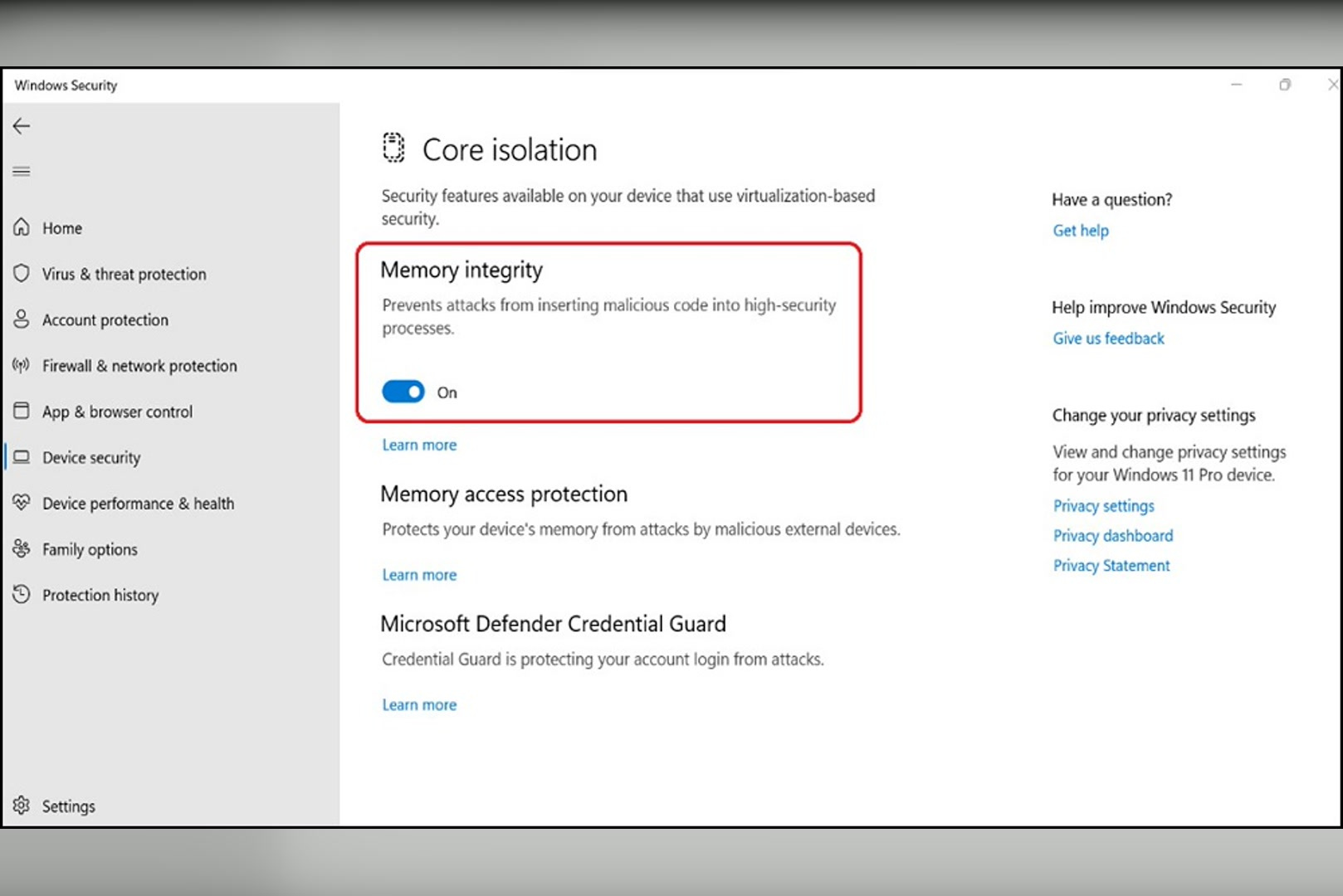
- Enable Memory Integrity in Windows if the error asks for it specifically: Windows Security, Device security, Core isolation details, set the toggle to On, then restart.
- If the toggle is unavailable, open Review incompatible drivers, update or remove the listed drivers (most often old peripherals and RGB lighting software), and repeat step 6.
- If the system stopped booting, revert the last BIOS change, then check two conflicts: Above 4G Decoding with integrated plus discrete graphics, and a RAID array together with IOMMU.
- Restart the PC and launch anti-cheat again. The check runs when the client starts; you do not need to confirm anything separately. If the required mechanism is on, the error window will not appear.
- If the BIOS item is still missing after a firmware update, this hardware has no support. There is no workaround; the only fix is moving to a supported platform.
Details for each step, including the exact BIOS routes for ASRock, ASUS, and MSI, are covered below.
Chronology: What Was and What Is Now
| Date | What changed |
|---|---|
| April 2025 | Limited IOMMU and VBS rollout starts. Some accounts receive the requirement |
| August 2025 | IOMMU and VBS become mandatory for all players above 3000 Elo |
| October 2025 | FACEIT publishes the final rollout schedule. According to the platform, IOMMU and VBS are at that point required for about 60 percent of players, while TPM 2.0 and Secure Boot are already active for about 95 percent |
| 25 November 2025 | TPM 2.0 and Secure Boot are mandatory for every player on the platform. New IOMMU expansion waves begin at the same time |
| December 2025 | Cheat forums mass-test a bypass via Intel VMD. Within a few weeks the method is called unstable and risky |
| January–March 2026 | More than 25 sellers release products with SSD and NVMe emulation as a way to bypass IOMMU. The method does not work |
| June 2026 | FACEIT help adds a separate article on boot failures, describing IOMMU as a mandatory condition for the anti-cheat |
| July 2026 | An independent audit puts IOMMU coverage at about 97 percent and finds no confirmed bypasses |
| 14 October 2026 | Windows 11 becomes mandatory. Windows 10 is no longer supported on the platform |
The key difference from the previous picture is simple. IOMMU and VBS used to be selective, and a player with virtualisation disabled could join matches for years. They are now effectively a baseline entry requirement: only accounts the latest wave has not yet reached remain uncovered. FACEIT still formally calls the rollout staged and has not published a full-coverage date, so treat the settings as mandatory today.
What IOMMU Is and Why It Broke DMA Cheats
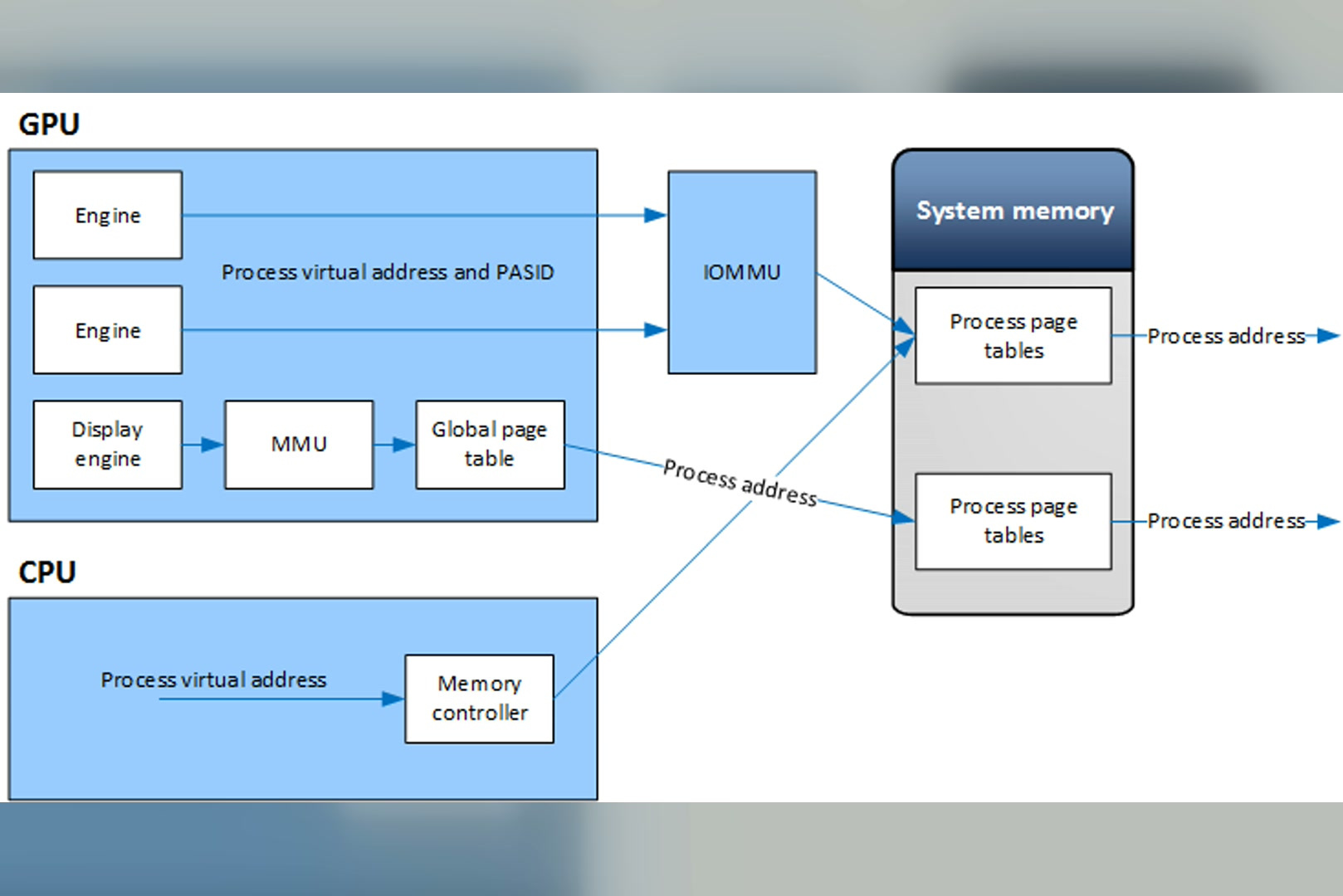
IOMMU stands for Input-Output Memory Management Unit. Intel calls this technology VT-d, AMD calls it AMD-Vi. The simplest way to think of it is as an access controller between PCIe devices and system memory.
DMA-capable devices can transfer data to and from system memory without the CPU copying every block itself. This is essential to the performance of graphics cards, network adapters, and storage controllers, but the same capability can be abused by cheats. A dedicated PCIe device may attempt to read game data from the gaming PC and send it to a second computer. Because no conventional cheat process needs to run on the gaming PC, this approach is harder for traditional software-only checks to detect.
IOMMU puts devices into address-translation mode: each one gets its own memory window and physically cannot reach beyond it. Windows uses this mechanism in Kernel DMA Protection: devices whose drivers support DMA remapping start normally, while others are blocked by default if they were connected before the user signed in or while the screen is locked. According to Microsoft, Kernel DMA Protection requires UEFI firmware and I/O virtualisation enabled in firmware, and the feature status is shown in System Information.
The effect on DMA cheats was significant. According to an external audit commissioned by FACEIT from Intorqa, standard DMA cheats stopped working shortly after enforcement expanded, and discussions in private forums changed rapidly. FACEIT also reported banning more than 200 players for DMA-based cheating during three months of limited rollout, including around 20 players using devices priced at approximately $4,500.
Why VBS Was Added on Top of IOMMU
VBS stands for Virtualisation-Based Security. It is a built-in Windows security architecture that uses the Windows hypervisor to create an isolated environment for sensitive security functions. This protected environment remains separated from the normal Windows kernel, even if kernel-level code is compromised.
FACEIT requires VBS because it helps the anti-cheat enforce IOMMU protections reliably in Windows. A security decision based only on a value reported by the normal operating-system environment would be easier to tamper with; placing the relevant protections behind the hypervisor makes manipulation substantially more difficult.
Memory Integrity, also known as HVCI (Hypervisor-Protected Code Integrity), is a security feature built on VBS. It validates kernel-mode code before allowing it to run and prevents executable kernel-memory pages from also being writable. This helps block attacks that load vulnerable signed drivers to gain kernel access. FACEIT may require Memory Integrity for specific players and lists it separately in its support documentation.
The full VBS requirement list from Microsoft documentation looks like this:
| Component | Requirement |
|---|---|
| Processor | 64-bit, with Intel VT-x or AMD-V hardware virtualization |
| Address translation | SLAT: Intel EPT or AMD RVI |
| I/O | IOMMU or SMMU: all DMA devices must sit behind it |
| Trusted module | TPM 2.0 |
| Firmware | UEFI, Memory Attributes Table, SMM protection per the WSMT specification, Secure MOR v2 |
| Boot | Secure Boot enabled |
| Drivers | Memory Integrity compatibility |
Note the IOMMU row. In Microsoft’s model, IOMMU is not an option for VBS but a constituent part of it. FACEIT’s requirements map onto this architecture one to one.
TPM 2.0 and Secure Boot: What They Do on Their Own
These two mechanisms cover boot, not memory.
Secure Boot builds a chain of trust: firmware checks the signature of every component that starts before the OS and blocks unsigned code. That closes UEFI-level cheat loaders.
TPM adds Measured Boot. The module hashes each boot stage and stores the results in protected registers. It can then issue a cryptographically signed report of how the system actually booted. The procedure is called attestation, and FACEIT anti-cheat checks that report’s signature before connecting to a match. You cannot fake it without access to the keys inside the chip.
The division of labor is this: Secure Boot and TPM cover a clean system start, IOMMU and VBS cover what happens after start. None of the four mechanisms replaces the others.
How to Check Your PC in Five Minutes
Before you open BIOS, see what is already enabled.
| What to check | Where to look | Expected value |
|---|---|---|
| Firmware mode | msinfo32, BIOS Mode line | UEFI |
| Secure Boot | msinfo32, Secure Boot State line | On |
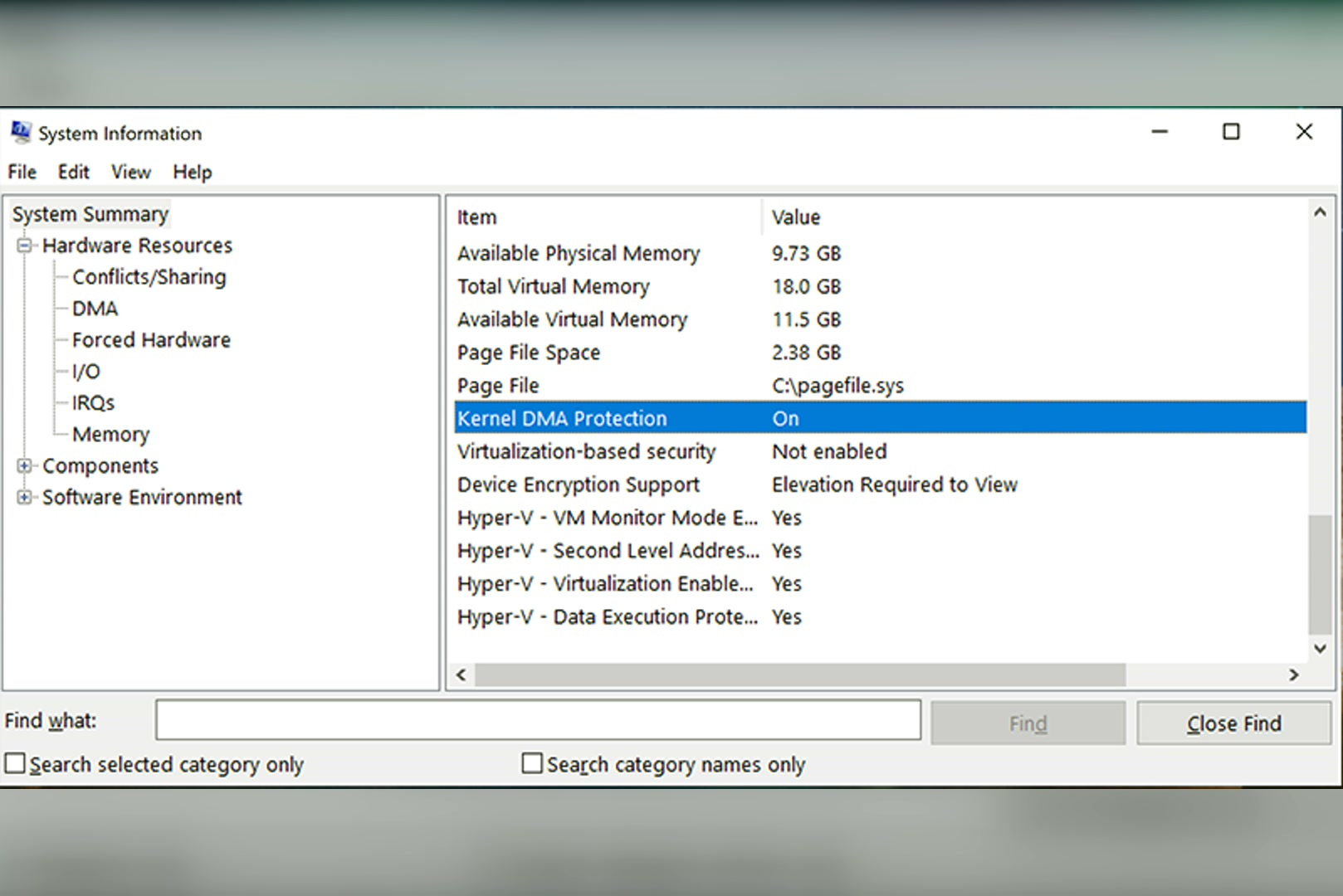
| IOMMU and DMA protection | msinfo32, Kernel DMA Protection line | On |
| Firmware virtualization | msinfo32, Hyper-V - Virtualization Enabled in Firmware line | Yes |
| VBS | msinfo32, Virtualization-based security and Virtualization-based Security Services Running lines | Running, with Hypervisor enforced Code Integrity present in the services list |
| TPM | tpm.msc, Status and Specification Version fields | The TPM is ready for use and 2.0 |
| TPM attestation | Windows Security, Device security, Security processor details | Attestation and Storage in Ready state |
| Memory Integrity | Windows Security, Device security, Core isolation details | Memory integrity set to On |
To open System Information, press the Windows key, type msinfo32, and press Enter. The Processor and BaseBoard Manufacturer lines there also show the CPU and motherboard model, which you will need to find the right BIOS item.
How to Enable IOMMU in BIOS
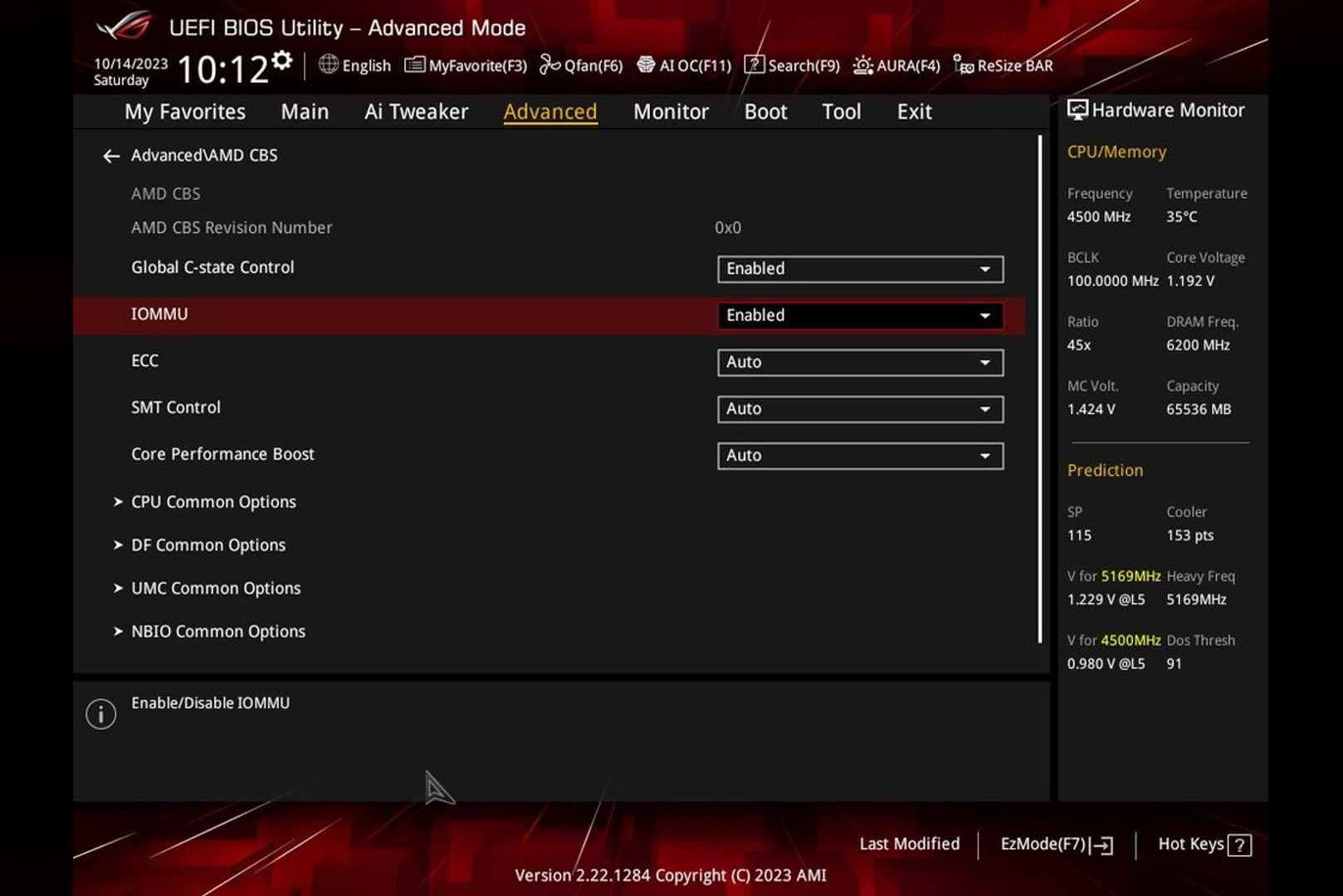
Menu names differ by manufacturer, so identify the board model first. Below are the routes for the three vendors FACEIT itself describes.
ASRock
At startup press Del, switch from Easy Mode to Advanced Mode with F6 if needed, then open Advanced. For AMD: AMD CBS, then NBIO Common Options, set IOMMU to Enabled. If DMA Protection and DMAr Support are visible, set those to Enabled too. If Pre-boot DMA Protection and Kernel DMA Protection indicator exist, enable them as well. For Intel: Chipset Configuration, set VT-d to Enabled, Control IOMMU Pre-boot behavior to Enable IOMMU during boot, Pre-boot DMA Protection to Enabled.
ASUS
Press Del and open Advanced. For AMD: AMD CBS section, set IOMMU to Enabled; if present, enable DMA Protection, DMAr Support, Pre-boot DMA Protection, and Kernel DMA Protection indicator (some of these may sit in NBIO Common Options). For Intel: System Agent (SA) Configuration, VT-d to Enabled, Control IOMMU Pre-boot behavior to Enable IOMMU during boot, Pre-boot DMA Protection to Enabled.
MSI
Press Del and open the OC section. For AMD: Advanced CPU Configuration, then AMD CBS, set IOMMU to Enabled; if DMA Protection and DMAr Support exist, set those to Enabled too, and if Pre-boot DMA Protection and Kernel DMA Protection indicator are visible, enable them as well. For Intel: CPU Features, VT-d to Enabled, Control IOMMU Pre-boot behavior to Enable IOMMU during boot, Pre-boot DMA Protection to Enabled, and DMA Control Guarantee to Enabled if that item exists.
If your vendor is not on the list or the items are missing, there are two steps. First: update BIOS, because on older firmware the menu with these parameters may simply not exist. Second: search for “how to enable IOMMU” plus the exact board model, or read the manufacturer’s manual.
A completely missing VT-d or AMD-Vi item means the CPU or board does not support them. Support exists on almost all processors from about 2015 onward.
How to Enable Virtualization, VBS, and Memory Integrity
VBS is not enabled in BIOS directly. Firmware needs hardware virtualization: Intel VT-x or AMD SVM Mode. Without it, Windows will not even show the Core isolation section.
Then in Windows:
- Press the Windows key, type Windows Security, and open the app.
- On the left, choose Device security.
- In the Core isolation block, click Core isolation details.
- Set Memory integrity to On. Administrator rights are required.
- Restart the computer.
On a clean Windows 11 install, Memory Integrity turns on automatically if the conditions match: an 8th-generation Intel processor or newer (for version 21H2 the bar is higher, from 11th generation), or AMD Zen 2 and newer, at least 8 GB of RAM, a system SSD of 64 GB or more, virtualisation enabled in BIOS, and compatible drivers. Automatic enablement does not run on an upgrade from a previous version, so a move from Windows 10 almost always needs a manual visit to the settings.
If the Memory integrity toggle is unavailable, an incompatible driver may be blocking the feature. Select Review incompatible drivers to identify the affected components. Update those drivers from the hardware manufacturer, or uninstall the associated device software if it is no longer needed.
What to Do If the PC Will Not Boot After the Changes
This is the most unpleasant scenario, and FACEIT put it in a separate guide. The order of actions is as follows.
The system does not start after enabling Secure Boot
A common cause is a mismatch between the boot mode and disk partition scheme: Secure Boot requires UEFI, while a legacy Windows installation may use an MBR system disk. Back up important data and verify the current configuration first. Microsoft’s MBR2GPT utility can convert a supported system disk to GPT; after a successful conversion, switch the firmware to UEFI and enable Secure Boot. If the system still fails to boot, revert the last change and consult the motherboard documentation or a technician.
Hang during boot with integrated plus discrete graphics
On some systems, FACEIT identifies Above 4G Decoding as a possible source of boot problems after enabling IOMMU. The setting may appear under PCI Subsystem Settings, Boot, or Advanced. Record its original value before testing Disabled, as changing it can affect other PCIe features.
RAID array and IOMMU
Some RAID drivers or firmware configurations may prevent Windows from booting with IOMMU enabled. Temporarily reverting the IOMMU change may restore access to the system, but do not disable RAID or alter the array without a verified backup: doing so can make the array inaccessible and cause data loss. Update the BIOS, chipset, and RAID drivers, then consult the motherboard or RAID vendor before making permanent changes.
Blue screens after enabling Memory Integrity
Check Windows updates, remove old and incompatible anti-cheats from other games, and update BIOS to the current version.
Error “TPM attestation is not ready”
On AMD boards with a module version like 3.x.0.x this is a known firmware defect fixed by a BIOS update. Vendors have released patches; for some they are still only in beta firmware.
Error “TPM attestation failed”
Two typical causes: a discrete TPM module (dTPM) on the board, and cloud-update systems in PC cafes. In the first case, switch to the built-in fTPM (Intel PTT or AMD fTPM); in the second, contact the cafe software vendor.
Secure Boot is on, but anti-cheat does not see it
A known quirk of some MSI boards. Go to Settings, Security, Secure Boot, set Secure Boot Mode to Custom and Secure Boot Preset to Maximum Security. On older firmware, use Image Execution Policy instead of the preset and set Removable Media and Fixed Media to Deny Execute.
General rule: change one parameter at a time and check boot after each step. That way you immediately see which item conflicts with your configuration.
Do IOMMU and VBS Reduce FPS?
FACEIT is cautious: TPM and Secure Boot do not affect performance; IOMMU and VBS can cause a small drop in some cases, more often on older systems and boards with unfinished firmware.
Independent measurements give a more specific picture. In a public 15-game test on a then-current CPU paired with a GeForce RTX 4090, enabling VBS cost about 5 percent of frames at 1080p on average. Microsoft Flight Simulator dropped the most: minus 11 percent at 1080p and minus 8 percent at 4K. At 4K the difference usually falls below 3 percent because the load shifts to the GPU.
| Scenario | Typical frame loss |
|---|---|
| Modern CPU, 1080p, average across games | about 5 percent |
| Modern CPU, 4K | under 3 percent |
| Heavy CPU-bound scenes | up to 11 percent |
| First-generation Ryzen and 10th-generation Intel platforms | about 30 percent in first-wave measurements |
The last row needs a note. Memory Integrity relies on a hardware acceleration mechanism: MBEC on Intel and GMET on AMD. Microsoft lists it among the conditions without which VBS and Memory Integrity do not turn on automatically. On platforms where hardware support is missing or weaker, hypervisor overhead is noticeably higher, and older systems suffer from VBS the most.
Separately, a boundary on these figures: there are no fresh CS2 measurements on current hardware in the public domain, so read the numbers above as an order of magnitude, not a forecast for a specific configuration.
Practical takeaway for CS2: on a current platform, enabling IOMMU and VBS will not knock you out of a comfortable frame range, while on a ten-year-old CPU the difference will show in both benchmarks and feel. If the system is already at its limit, a platform upgrade solves it more reliably than hunting for a way around the requirements.
Who Will Have to Change Hardware
Most systems fall into one of three categories.
First: support is there, but disabled
This is the most common case: enable the required settings in BIOS/UEFI, save the changes, and restart the PC.
Second: support is there, but firmware gets in the way
The relevant settings may be missing or may not work correctly. Updating the BIOS/UEFI can add support or resolve firmware issues.
Third: there is no support
If the firmware has neither VT-d nor AMD-Vi, you cannot work around the requirement. FACEIT is explicit: when enablement is mandatory, there is no bypass, and incompatible hardware means moving to a supported configuration. The indicator the platform itself offers: check the PC’s Windows 11 compatibility. If the system meets those requirements, the odds of supporting all four mechanisms are high, though that check is not a guarantee.
Another important date is 14 October 2026, when FACEIT plans to stop supporting Windows 10. Microsoft ended standard Windows 10 support on 14 October 2025, and the consumer ESU programme runs until 13 October 2026. FACEIT aligned its schedule with the end of those extended security updates.
If your CPU and board do not meet Windows 11 requirements, you have one scenario: a platform upgrade. You can pick a ready-made CS2 PC with a modern CPU, VT-d or AMD-Vi support, and correct firmware in the HYPERPC gaming PC catalog.
Does This Even Work Against Cheaters
FACEIT also cites external monitoring data rather than relying solely on its own claims.
The external audit FACEIT commissioned from Intorqa tracked the CS2 cheat market from late 2025 through March 2026. What was recorded:
- The number of tracked cheat sellers for the platform grew from 50 to 88, while purely software cheats almost disappeared from the market.
- After the IOMMU requirement expanded, standard DMA cheats stopped working, and discussion on closed forums changed tone within days.
- The first bypass attempt via Intel VMD spiked interest in December 2025, then faded quickly: buyer reviews shifted from “it works” to “unstable and risky” amid ban waves.
- From January to March 2026, more than 25 sellers advertised SSD- and NVMe-emulation products as IOMMU bypasses. According to the audit, these products did not provide a confirmed working bypass.
- No confirmed IOMMU bypass was found by the end of the audit, even though some sellers asked up to $1,500 a month for such promises.
- The audit estimated IOMMU coverage at about 97%. This was an external estimate rather than a universal-enforcement figure published by FACEIT.
There is also a trade-off: pressure on DMA cheats can shift demand towards two-PC and computer-vision methods that use video capture and external input emulation rather than reading game memory. Hardware memory protections do not directly address this category, so anti-cheat systems must also rely on behavioural detection, including aim patterns, reaction times, and movement analysis.
In other words, IOMMU and VBS make a common class of DMA-based cheats substantially harder to use, but they do not eliminate every form of cheating.
Frequently Asked Questions We prepared the answers.
-
Can you play on FACEIT with IOMMU disabled?
Until the requirement wave reaches your account, anti-cheat will let you in without it. Once the requirement is on, an error appears at launch and you cannot join the match.
-
Are IOMMU and VBS the same thing?
No. IOMMU is a hardware function of the CPU and chipset that limits device access to memory. VBS is a Windows software mechanism based on a hypervisor. FACEIT requires both because VBS is needed for reliable control of IOMMU state.
-
Does everyone need to enable Memory Integrity?
Not everyone. Anti-cheat asks for it from some players separately, and FACEIT help says explicitly that you do not need to enable it without a request.
-
Will these settings interfere with emulators and virtual machines?
Hardware virtualisation is also used by virtual machines and many emulators, so enabling it does not inherently prevent them from working. Compatibility problems are more likely to involve older drivers or software that conflicts with Memory Integrity or Hyper-V.
-
What happens to Windows 10 after 14 October 2026?
FACEIT will stop supporting that OS. You will be able to play only on Windows 11, so upgrade in advance, not on the last day.
-
Is a BIOS update mandatory?
Not always, but it is often the fastest path. On older firmware the required items may be physically missing, and some TPM attestation errors are fixed only by an update.
Conclusion
FACEIT’s logic is unambiguous. The platform stopped fighting cheats at the software layer alone and moved the check onto hardware: trusted boot through Secure Boot and TPM, memory isolation through IOMMU, and a guarantee of that isolation through VBS. The DMA-cheat class that for years looked unbeatable stopped paying off after that.
For an honest player the cost is small: one visit to BIOS, virtualisation enabled, and current firmware. Problems start only where the hardware is older than ten years or the firmware has not been updated in a long time. Those configurations will hit the next line: 14 October 2026, when Windows 11 becomes mandatory.
Check msinfo32 right now. If Kernel DMA Protection shows Off, sort it out in a calm session rather than five minutes before a match starts.

 Arabic
  English